
IRS workflow
Publication 463Purpose, destination, date, and distance stay visible in the review flow.
US mileage tracking
Trips detect themselves, a swipe keeps business, commute, and private separate, and exports carry the fields the IRS expects.
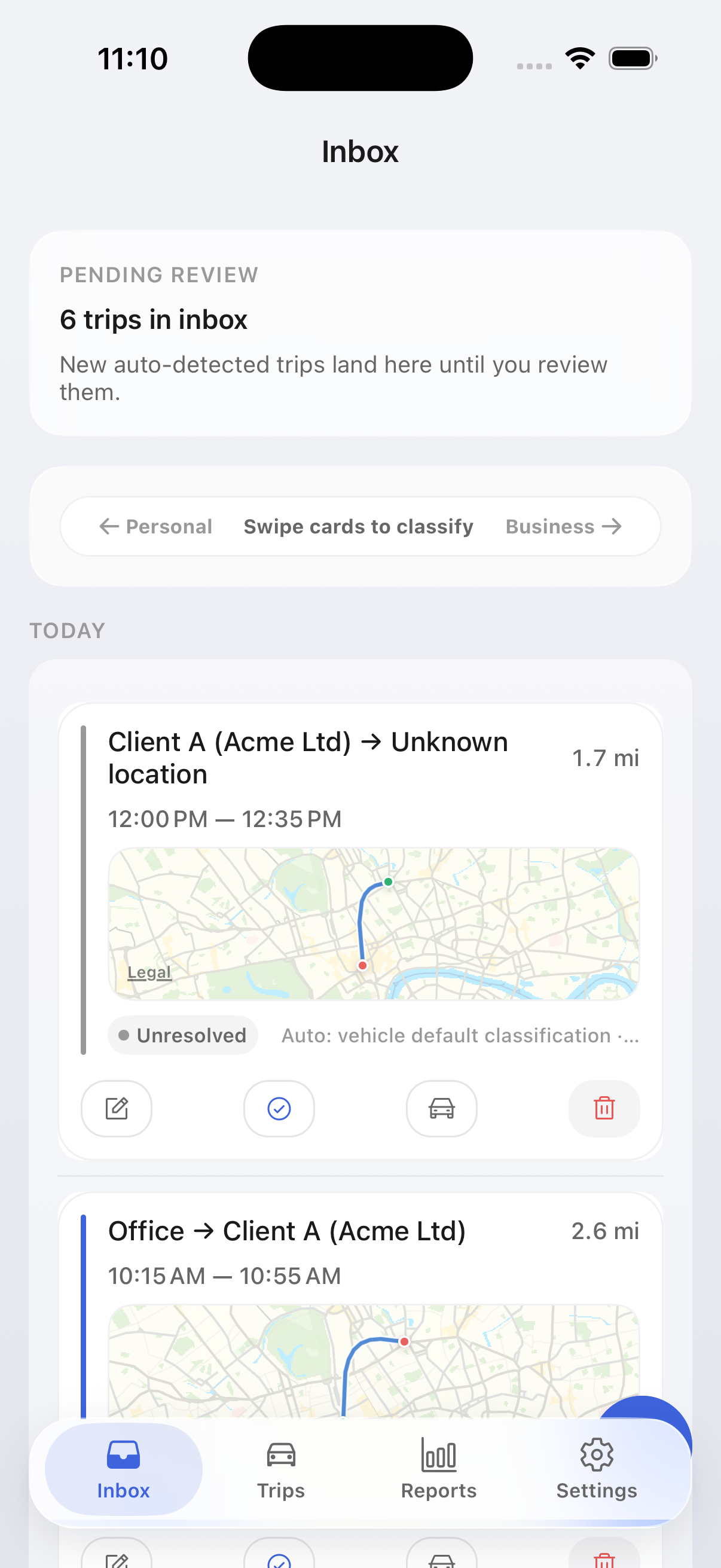

Purpose, destination, date, and distance stay visible in the review flow.
Correction suggestions and split/merge edits fix over-detected or fragmented drives.
Trip logs stay local by default; explicit Apple service use is disclosed separately.
Storage defaults
Trip history and saved places stay on your device by default. On iPhone, Apple Maps is used only when you explicitly request address or map actions.
US product page
The US page focuses on Schedule C and contractor recordkeeping with plain filing language and clear evidence expectations.
Routine commute is not buried inside personal trips, which reduces overclaim risk when you review exports for tax prep.
Export PDFs and raw files with the fields preparers expect to see when they review Publication 463-style records.
Trip logs stay local by default, while explicit Apple service use and optional telemetry are described separately.
US workflow
Use the same loop every month so filing season becomes review and export, not reconstruction.
Driving starts and stops are detected in the background so missing records do not pile up.
Add or confirm purpose only where needed, while commute remains separate from business mileage.
Export a filing-friendly PDF plus raw files so you can keep your own year-end archive.
The export
PDF for the filing folder, CSV and XLSX for your preparer — free, with date, destination, purpose, and miles as separate columns. Commute never leaks into the business total.
| Date | Destination | Purpose | Miles |
|---|---|---|---|
| Aug 12 | Keller Supply, Tacoma | On-site install | 34.6 |
| Aug 12 | Home → office | Commute | 11.2 |
| Aug 13 | Northgate clinic | Client meeting | 18.9 |
| Aug 14 | School run | Private | 4.1 |
| Business total, August | 312.4 mi | ||
FAQ
MileTrack is currently free to use, and that includes the export. There is no paid tier between automatic trip detection and a finished PDF, CSV, or XLSX mileage log, and no account or card is required to start.
Publication 463 expects the date of each trip, the destination, the business purpose, and the miles driven, recorded at or near the time of the drive. MileTrack captures those four fields on every trip and keeps them as separate columns in the export, so the record does not have to be reconstructed at filing time.
Grant motion and location permissions once, then drive. Trips start and stop on their own in the background, land in the Inbox for review, and a swipe marks each as business, commute, or private. Add a purpose only where one is missing.
Yes, and that separation is the point. Commute is a distinct trip type rather than a subset of personal driving, so home-to-office miles never inflate the business total you hand a preparer.
A filing-friendly PDF for the folder, plus CSV and XLSX for a preparer or a reimbursement claim. Each export carries date, origin, destination, distance, purpose, vehicle context, and the country profile active at export time, with business, commute, and private totals kept apart.
Trip history, saved places, vehicles, and reports stay on-device by default. On iPhone, explicit address lookup, route preview, reverse geocoding, Look Around, and map viewing can contact Apple mapping services in real time, but MileTrack does not host trip history on its own servers in the current beta.
Download MileTrack free from the App Store on iPhone — no account, no card. Install it, grant motion and location permissions, and the first drives are detected automatically. Android is not published yet.
Get started
Get free access now, then use the US guide library whenever you need filing-specific help.

On a computer? Scan with your iPhone camera.