
HMRC workflow
Claim-readyJourney purpose, route context, and distance stay visible before export.
UK mileage tracking
Journeys detect themselves, a swipe marks each as business or private, and exports stay HMRC-ready.
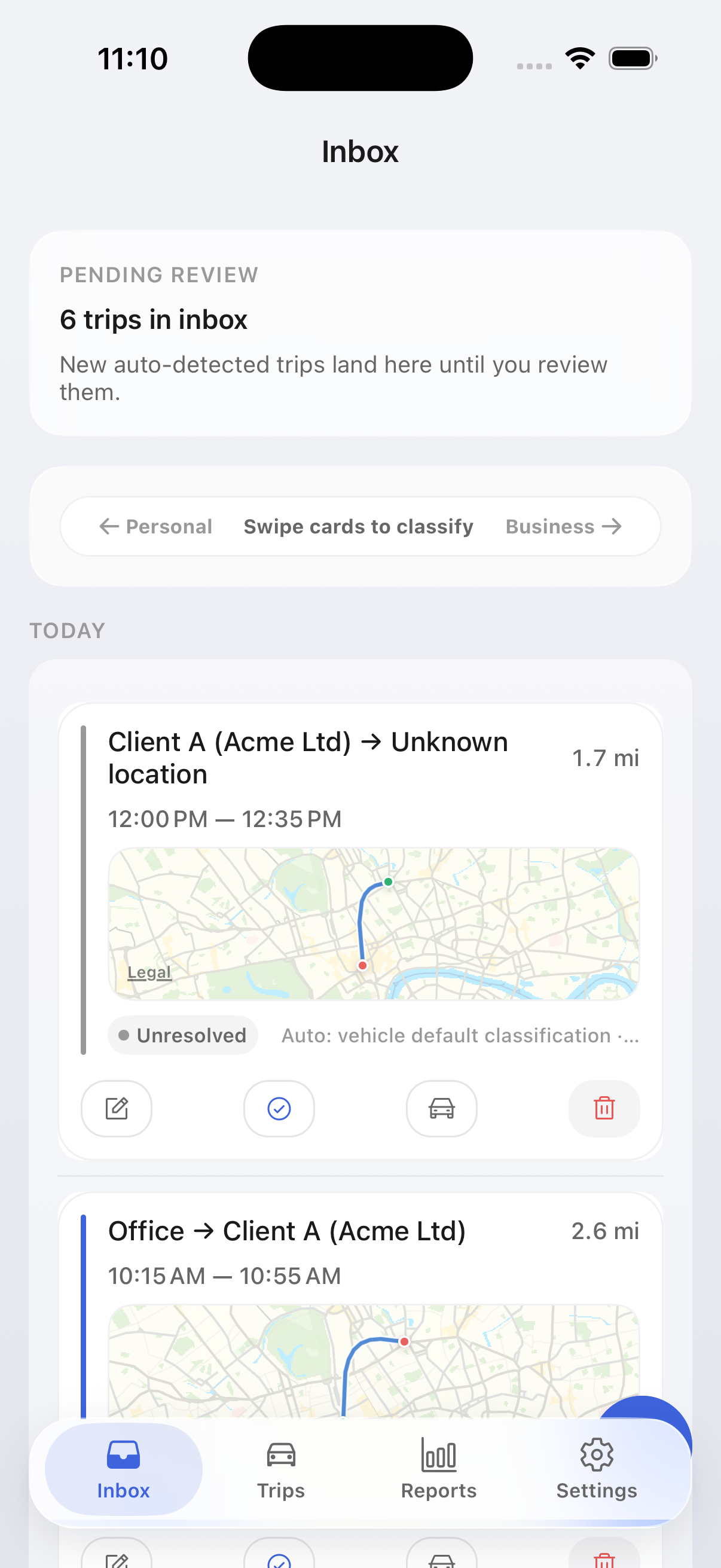

Journey purpose, route context, and distance stay visible before export.
Correction suggestions and split/merge edits clean journey records before claim export.
Trip logs stay local by default; explicit Apple service use is disclosed separately.
Storage defaults
Trip history and saved places stay on your device by default. On iPhone, Apple Maps is used only when you explicitly request address or map actions.
UK product page
The UK page focuses on commute rules, AMAP context, and evidence retention in plain HMRC language.
Home-to-workplace runs are marked private, so only business journeys reach the export total and UK review decisions are visible earlier in the workflow.
Exports retain the journey fields accountants and claim reviewers expect to see when checking mileage evidence.
The UK page and the UK guides both describe the product through HMRC language and UK-specific recordkeeping context.
UK workflow
Use a short weekly review instead of reconstructing an entire tax year from memory.
Background detection reduces the chance that a business journey is missed before you even review it.
The review queue focuses on journeys that still need purpose or a classification correction.
Store PDF and spreadsheet exports as a clear monthly evidence trail for your claim history.
The export
PDF for your records, CSV and XLSX for your accountant — free, with date, journey, purpose, and miles as separate columns. Ordinary commuting never leaks into the business total.
| Date | Journey | Purpose | Miles |
|---|---|---|---|
| 12 Aug | Client site, Reading | Project visit | 41.3 |
| 12 Aug | Home → office | Ordinary commuting | 9.8 |
| 13 Aug | Supplier, Slough | Stock pickup | 17.5 |
| 14 Aug | School run | Private | 3.2 |
| Business total, August | 286.7 mi | ||
FAQ
MileTrack is currently free to use, and that includes the export. There is no paid tier between automatic journey detection and a finished PDF, CSV, or XLSX mileage log, and no account or card is needed to start.
For each business journey: the date, where you started and finished, why you made the trip, and the miles driven. MileTrack records the date, route, and miles on every journey, you add the purpose, and the export keeps each as its own column, so nothing has to be rebuilt from memory at Self Assessment time.
From 6 April 2026 the approved mileage rate for cars and vans is 55p a mile for the first 10,000 business miles in the tax year and 25p after that. The 55p tier replaced 45p, which had stood since 2011. MileTrack's UK profile carries both tiers.
The UK profile draws the line HMRC draws: a journey is business or it is private. Ordinary travel between home and your permanent workplace is not business mileage, so you mark it private and it stays out of the claim. Only business journeys count towards the total.
Yes. If your employer pays less than the approved rate, the shortfall is claimable as Mileage Allowance Relief, and the export gives you the business miles and the journey detail behind them. If you file a Self Assessment return, the claim goes on that return; otherwise claim through the GOV.UK online service or on form P87.
Journey history, saved places, vehicles, and reports stay on-device by default. On iPhone, explicit address lookup, route preview, reverse geocoding, Look Around, and map viewing can contact Apple mapping services in real time, but MileTrack does not host journey history on its own servers in the current beta.
Download MileTrack free from the App Store on iPhone, with no account and no card. Install it, grant motion and location permissions, and the first journeys are detected automatically. Android is not published yet.
Get started
Get free access, keep journeys tidy month by month, and use the UK guide library when you need HMRC detail.

On a computer? Scan with your iPhone camera.